
Page Contents
Last updated: November 2026
Contact form marketing is a way of reaching businesses by submitting your message through the contact form on their own website instead of sending it to an email address. The message arrives as a normal website enquiry, so it avoids the filters and sender-reputation problems that cold email faces. It works best for B2B offers where you can say something specific about the company you are writing to. This guide shows how to do it in eight steps, how to write the message, how to stay on the right side of the rules and how to measure results. A short final section covers the other meaning of the phrase: turning the form on your own website into a lead source.
Two Meanings of Contact Form Marketing
| Outbound contact form marketing | Inbound form marketing | |
|---|---|---|
| What it is | You submit your pitch through other companies’ contact forms | You optimize your own contact form to capture more and better leads |
| Typical goal | Start conversations with prospects, partners, publishers or creators | Turn website visitors into enquiries |
| Main skill | List building and short, relevant copywriting | Form design, tracking and fast follow-up |
| Covered in | Steps 1 to 8 below | The final section |
Most of this article is about the outbound meaning, since that is what the phrase usually refers to in search results today.
Is Contact Form Marketing Right for You?
It suits some offers and not others. Use this checklist before investing time:
- You sell to businesses that publish a contact page: agencies, software, services, manufacturers, local businesses.
- You can name a specific reason to contact each company (a product they sell, a market they entered, a problem you can see).
- Your offer can be explained in two or three sentences and a small first step is easy for them to say yes to.
- You are comfortable with low volume. A form submission is typed or pasted one company at a time, so quality has to carry the channel.
- You can handle replies from gatekeepers who may ask who you are or forward you elsewhere.
If most answers are no, an inbound approach such as content and search may serve you better. Read the comparison table later to see where the two channels differ.
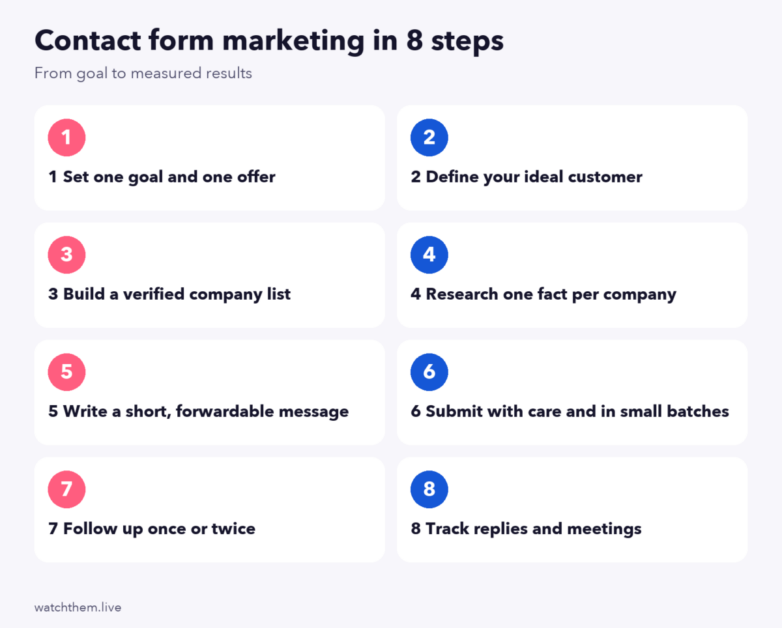
How to Do Contact Form Marketing: 8 Steps
Step 1: Set one goal and one offer
Choose the single outcome of the first message. Common goals are a reply, an introduction to the right person, a short call or permission to send details. Pair it with one offer: a service, a free audit, a partnership idea or a product sample. Trying to promote three things in one message is the fastest way to be ignored.
Step 2: Define your ideal customer
Write down who you want: industry, company size, location, tools they use, signs that they have the problem you solve. A narrow description saves time because every extra company you contact outside it lowers your reply rate and raises complaint risk.
Step 3: Build a verified company list
Collect companies that match step 2 from directories, industry lists, search results or your own research. Then check each one:
- Does the site have a working contact form (not only an email address)?
- Is the business active (recent posts, products, reviews)?
- Does the form say what it is for? Some forms are meant for support only, and a sales pitch there will be unwelcome.
- Are you already in conversation with them? Remove existing customers and past contacts.
Keep the list in a spreadsheet with columns for company, URL, form link, one fact, message sent, date and result.
Step 4: Research one fact per company
Spend a minute finding something real: a new product page, a hiring post, a market they serve, a recent announcement. This single fact becomes your first sentence. It proves the message was written for them and gives the gatekeeper a reason to forward it.
Step 5: Write a short, forwardable message
A contact form message has no subject line, so the first sentence does that job. A reader, often someone handling general enquiries, decides in seconds whether to pass it on. Aim for 60 to 120 words and use this order:
- Why them: one specific, true observation.
- What you do: one sentence, in the customer’s vocabulary.
- Proof: one checkable fact, such as a named result or a client type, only if you can support it.
- A small ask: “Could you point me to whoever handles X?” is easier to answer than “Can we have a 30-minute call?”
- Who you are: name, company, website and a real reply address.
Before and after
Weak: “Hello, we are a leading provider of innovative marketing solutions. We would love to schedule a call to discuss how we can help your business grow. Visit our website to learn more.”
Better: “Hi, I saw you recently opened a second showroom in Leeds. We help furniture retailers see where visitors drop off on product pages, and I noticed your product pages load several large images. Could you tell me who handles your website performance? Happy to send a two-line summary of what I found. Maria Lopez, Example Analytics, example.com, [email protected].”
The better version names a fact, states what the sender does, makes a small ask and gives the contact details. (The names are illustrative.)
Step 6: Submit with care and in small batches
Submit each message to the company’s form, filling every required field honestly: real name, real email, your company name. Work in small daily batches so you can read replies and adjust. Do not try to defeat CAPTCHAs or other anti-spam checks; if a form blocks you, that is the site’s choice and your list should skip it. Tools exist that help with parts of the process (finding forms, filling fields, tracking), but automated volume without review is how a legitimate outreach program turns into spam.
Step 7: Follow up once or twice
Silence is common, because a gatekeeper may never forward a message. Send one follow-up after about a week, adding something new (a relevant observation, a short example) instead of repeating the first message. A second follow-up after another week or two is the most you should send. If there is no answer, stop and note it in your sheet.
Step 8: Track replies and meetings
Form submissions give no open or click data, so measure outcomes: replies, referrals to the right person, meetings booked and deals. Use a distinct landing page or a unique link in the message so web analytics can attribute visits. See the measurement section below for formulas.
Why Companies Use It: Benefits and Limits
Benefits
- Delivery: a submission is delivered by the site’s own form, not through your sending domain, so spam filtering of cold email is less of a factor.
- Context: the message arrives looking like an enquiry, which is how it is likely to be read.
- Low setup: no email infrastructure or sending reputation is needed.
- Targeting: because you research each company, relevance can be high.
Limits
- Gatekeepers: the first reader may not be the decision maker, so your message has to be easy to forward.
- No feedback signals: no opens, clicks or bounces unless you build tracking.
- Low volume: quality and research limit how many you can send.
- Legal gray areas: see the next section.
Vendors who sell tools for this channel describe high response rates, but those claims are rarely independent. Treat any numbers as vendor figures and measure your own results.
Contact Form vs Cold Email
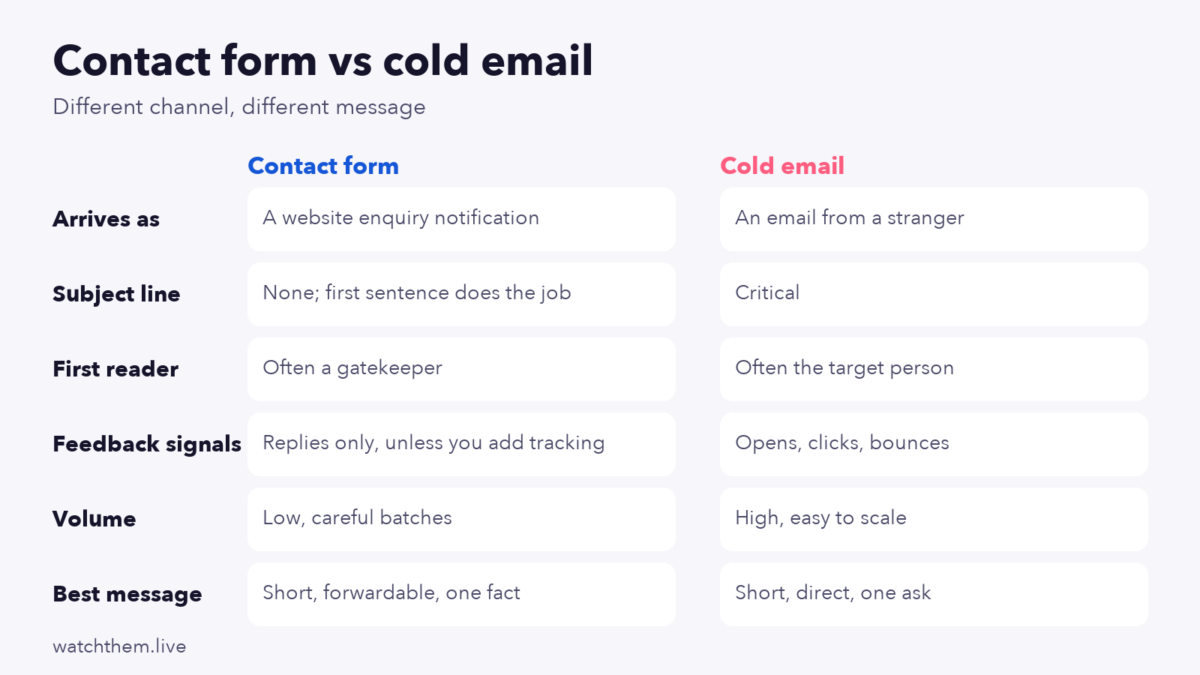
A message that works as a cold email often fails as a form submission, because email copy is written to be opened and a form message is written to be forwarded. Rewrite instead of pasting the same text. If you also use email outreach, compare how each channel performs on the same offer.
Legal and Ethical Guidelines
This section is general information, not legal advice. Rules differ by country and change over time, so check with a professional if your program is large.
- United States: the CAN-SPAM Act governs commercial email and states that it makes no exception for business-to-business messages. It asks for accurate header information, a non-misleading subject line, a clear indication that the message is an ad, a valid postal address and a working way to opt out. The law refers to email, and website contact forms are not named in it, so how it applies to form submissions is not settled. A careful sender follows the same principles anyway.
- United Kingdom and EU: the UK’s PECR rules treat email, phone and fax by channel and, in general, do not require prior consent for emailing corporate subscribers, but they still require you not to hide your identity and to give a valid opt-out address. Sole traders are generally treated as individuals. Data protection law (UK GDPR or GDPR) can apply as soon as a message identifies a named person.
- Everywhere: use your real identity, be honest about why you are writing, respect a “no” and keep a suppression list of companies that asked not to be contacted.
Good practice is simple: if you would be uncomfortable explaining the message to the recipient’s manager, do not send it.
Common Mistakes
- Copying a mass template. Merged names with generic text are easy to spot.
- Pitching on support forms. Always check what the form is for.
- Writing long messages. Anything beyond a short screen is rarely read in full.
- Asking for a meeting immediately. A gatekeeper cannot approve one; ask for a pointer instead.
- Hiding who you are. Fake names or vague company details destroy trust and may break rules.
- Not tracking. Without a sheet and unique links you cannot tell what worked.
- Ignoring opt-outs. A polite “please remove us” must end contact immediately.
How to Measure Contact Form Marketing
Because there are no opens or clicks, define your measures around outcomes:
| Metric | Formula | What it tells you |
|---|---|---|
| Reply rate | Replies ÷ messages submitted × 100 | Whether message and targeting land |
| Positive reply rate | Interested replies ÷ messages × 100 | Quality of the match |
| Referral rate | Pointed to the right person ÷ replies × 100 | How well the message travels past the gatekeeper |
| Meeting rate | Meetings ÷ messages × 100 | Pipeline created |
| Cost per meeting | (Time cost + tool cost) ÷ meetings | Efficiency compared with other channels |
| Opt-out rate | “Remove us” replies ÷ messages × 100 | Whether you are annoying the market |
Worked example
Suppose you submit 200 messages in a month. 18 companies reply (9% reply rate), 7 reply with interest (3.5%), 4 point you to the right person and 5 agree to a call (2.5% meeting rate). Illustrative numbers like these help you set a baseline, but your own rates will depend on industry, offer and list quality. Use the same thinking as in micro and macro conversions: a reply is a micro step, a booked call or sale is the macro goal.
To connect visits to messages, send people to a dedicated page with a unique address and watch it in analytics. The setup is covered in goal conversion rate in Google Analytics, where you can mark a demo request or enquiry as a key event. For the whole path from message to deal, compare your results with a sales funnel vs marketing funnel view so each team sees its part.
Features to Look for in Contact Form Marketing Software
If you use a tool, check these points first:
- Lets you review and edit every message before it goes out.
- Stores a record of each submission with date, company and message text.
- Supports a suppression list and respects opt-outs.
- Handles personalization fields without producing awkward merged text.
- Gives clear limits on daily volume.
- Reports replies and outcomes, not only “sent”.
- Does not promise to bypass security checks.
The Other Meaning: Make Your Own Contact Form a Lead Source
If your goal is to receive more qualified enquiries, the form on your own site is a marketing asset. A few practices come up repeatedly in guides on high-converting forms:
- Ask for less. Completion tends to fall as fields increase, while fewer fields can mean lower-qualified leads, so test the balance with A/B tests (see CRO testing guide).
- Skip intrusive fields such as phone number or revenue unless you truly need them.
- Write a specific button label (“Get my free audit”, not “Submit”) and test first-person wording.
- Use the right mobile input types so the correct keyboard appears, as covered in mobile conversion rate optimization.
- Reassure: show a privacy note, expected reply time and what happens next.
- Confirm submission with a thank-you page, which also gives analytics a clean event to track.
- Protect against spam with hidden fields or CAPTCHA, because contact forms are common bot targets.
- Reply quickly. Speed to first response is under your control and costs nothing.
To find where visitors struggle, watch real sessions: a session recording tool shows hesitation, repeated field errors and abandoned forms.

Keep an eye on the numbers around the form too: form view rate, start rate, completion rate and lead quality. The lead conversion guide explains how to follow a lead after the form, and what is a good conversion rate helps you set realistic targets.
Frequently Asked Questions
What is contact form marketing?
It is the practice of sending marketing or sales messages through the contact forms on other businesses’ websites. The phrase is also used for optimizing your own contact form to generate leads.
Is contact form marketing legal?
Laws vary by country and none of the main email rules clearly name contact forms. Many practitioners behave as if email rules apply: identify yourself, be honest and honor opt-outs. This is not legal advice.
Is it the same as spam?
It becomes spam when it is irrelevant, deceptive or sent in bulk with no research. A short, relevant, honest message to a company that fits your offer is closer to ordinary business outreach.
How many messages should I send?
Start with small batches, for example 20 to 50 a day at most, and increase only if replies are positive and opt-outs are low. Quality of research limits volume more than tools do.
Does it work better than cold email?
It depends on your market and message. Delivery can be easier, but you get no open or click data and the first reader is often a gatekeeper. Test both on the same offer and compare reply and meeting rates.
What should I write in a contact form message?
One true observation about the company, one sentence on what you do, one checkable proof point, a small ask and your real contact details.
Do I need special software?
No. A spreadsheet and careful manual work are enough to test the channel. Software helps with record-keeping and personalization at larger scale.
Conclusion
Contact form marketing rewards research and restraint: choose a narrow audience, verify each form, write a short message that is easy to forward, follow up sparingly and track replies and meetings. Behave as though email rules apply, keep a suppression list and never hide who you are. And if your goal is more enquiries, apply the same care to your own form: fewer fields, clear promises, mobile-friendly inputs, fast replies and tracking that shows what works.
