
Page Contents
Last updated: October 2026
If you could track only one number about your website, many marketers would choose the conversion rate. It tells you what share of your visitors do what you want them to do, whether that is buying a product, signing up for a newsletter, requesting a quote or downloading a guide. Traffic shows how many people arrive. Conversion rate shows how many of them matter.
This guide explains what conversion rate is, how to calculate it, how it differs in Google Analytics 4, what the benchmarks look like in 2026 and how to improve it. Where figures come from secondary sources and vary, we say so.
What Is Conversion Rate?
Conversion rate is the percentage of visitors who complete a chosen goal. The goal, called a conversion, can be anything valuable to your business:
- Making a purchase
- Filling in a contact or lead form
- Subscribing to a newsletter
- Creating an account or starting a free trial
- Booking a demo or a call
- Downloading a file
Conversion rate links your marketing effort to results. If two campaigns bring the same number of visitors, the one with the higher conversion rate produces more customers for the same cost. It is also the central metric of conversion rate optimization.
How to Calculate Conversion Rate
The formula is simple: divide the number of conversions by the number of visitors in the same period, then multiply by 100.
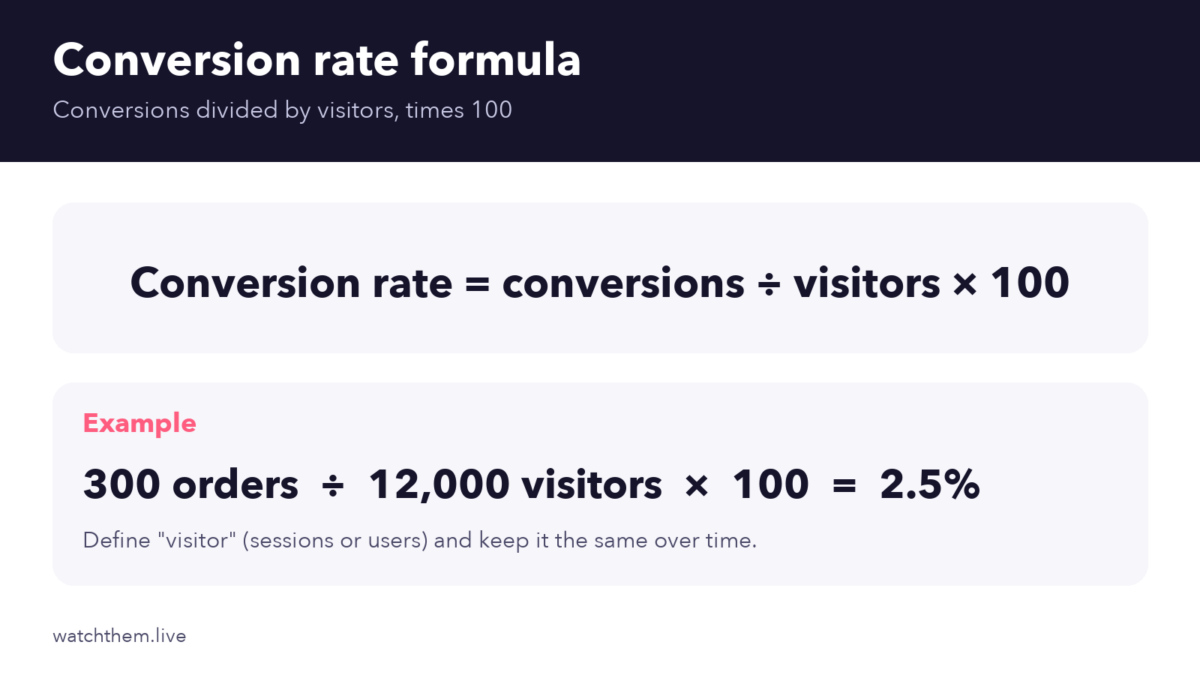
For example, if 300 orders come from 12,000 visitors in a month, the conversion rate is 2.5%. You can calculate it for the whole site, for one page, for one campaign or for one traffic source. Our step-by-step guide to how to calculate conversion rate covers more examples.
Choose the Right Denominator
Be clear about what you count as a “visitor,” and keep it consistent. You can divide by sessions (visits), by users (unique people) or by visitors to a specific page. A rate based on sessions is usually lower than one based on users, because one person can visit several times before converting. Mixing methods is a common reason why numbers from different tools do not match.
Conversion Rate in Google Analytics 4
In 2024, Google renamed “conversions” in GA4 to “key events,” and the rates changed names too. GA4 reports two versions:
- Session key event rate: the share of sessions that include at least one key event. If 600 of 20,000 sessions include a purchase, the rate is 3%, no matter how many key events those sessions contain.
- User key event rate: the share of users who trigger at least one key event in the selected period.
To get meaningful numbers, mark only your most important actions as key events and use consistent event names. For goals and funnels in GA4, see our guide to measuring goal conversion rate in Google Analytics.
Types of Conversions
- Macro conversions are your main business goals, such as a sale or a qualified lead.
- Micro conversions are smaller steps that lead to them, such as watching a video, adding a product to the cart or starting a form. Tracking them helps you find where people stall. See micro conversions and the guide to micro versus macro conversion.
Do not confuse conversion rate with click-through rate (CTR). CTR measures how many people click an ad or link, while conversion rate measures how many then complete the goal. Read conversion rate vs. CTR for the difference.
Why Is Conversion Rate Important?
- It shows how well your site persuades. A low rate with healthy traffic points to problems in your offer, design or trust signals.
- It lowers acquisition costs. When a higher share of visitors convert, each customer costs less to win.
- It guides decisions. Comparing rates by page, device and source shows where to invest.
- Small gains add up. Moving from 2% to 2.5% is 25% more orders from the same traffic.
The Conversion Funnel
Visitors rarely convert in a single step. They move through a funnel: they arrive, look at pages, compare options, add to the cart or start a form, and finally complete the goal. Each step has its own conversion rate, and the overall rate is the product of all of them. That is why looking only at the final number hides where the real problem is. Study each step with funnel analysis, and improve it with funnel optimization.
What Is a Good Conversion Rate?
There is no single answer. Recent roundups put the average e-commerce conversion rate at roughly 2–3%, with food and beverage near the top and luxury goods near 1%. Unbounce’s 2024 benchmark report, based on over 41,000 landing pages, reported a median landing page conversion rate of about 6.6% across industries, with large differences by sector. Device matters, too: one 2025 roundup put desktop at about 3.9% and mobile at about 1.8%, though sources differ.
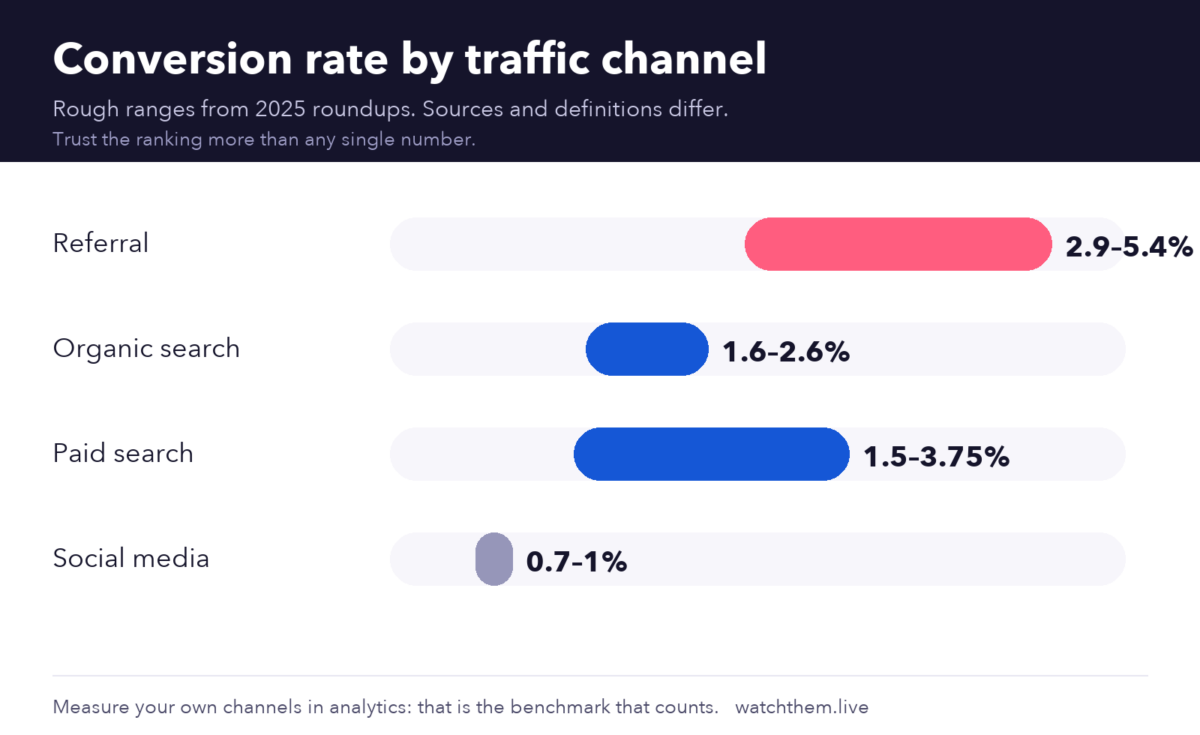
By channel, roundups generally agree on the ranking more than the numbers: referral traffic and email tend to convert well, search sits in the middle and social media usually converts lowest. Treat any single percentage with caution, since vendors define “conversion” and “visitor” differently. The best benchmark is your own history, split by channel and device. For more detail, see what is a good conversion rate and e-commerce conversion rate benchmarks.
What Affects Conversion Rate?
Many factors influence whether a visitor converts. The most common are:
- Traffic quality: visitors who are a poor fit will not convert, whatever the page looks like.
- Offer and value proposition: how clear and attractive the promise is.
- Page speed: a Deloitte study for Google found that a 0.1-second mobile speed improvement lifted retail conversion by about 8.4%.
- Design and usability: layout, readability and mobile experience.
- Trust: reviews, guarantees, security and clear policies. A Spiegel Research Center study found that products with five reviews were about 270% more likely to be bought than those with none.
- Friction: long forms, forced account creation and unexpected costs.
See key factors that influence your conversion rate for a deeper list.
How to Improve Your Conversion Rate
Start with research, then change one thing at a time.
1. Find Out Why Visitors Leave
Numbers show where people drop off, but not why. Use session recordings to watch real visits and see hesitation, errors and rage clicks.
2. Study Where Visitors Click
Heatmaps show which elements attract clicks and where people stop scrolling, so you can see if your main button is noticed.
3. Make the Offer and Call to Action Clear
Use a headline that states the benefit, one main call to action and specific button text such as “Get my free quote.”
4. Reduce Friction
Shorten forms, show total costs early and offer guest checkout. Roundups that cite Baymard Institute research put average cart abandonment near 70%, with extra costs, forced account creation and low trust among the top reasons.
5. Speed Up and Optimize for Mobile
Compress images, remove unused scripts and test on real phones. Google’s Core Web Vitals target a Largest Contentful Paint of 2.5 seconds or less.
6. Add Proof
Place ratings, testimonials and case studies near calls to action and prices.
7. Test Changes
Run A/B tests, wait for reliable results and record what you learn. Our guides to landing page testing and conversion rate optimization strategies explain how.


If your rate is far below normal, read why your conversion rate may be low and run a quick CRO audit.
Common Conversion Rate Mistakes
- Comparing to a benchmark without context. Industry, device and channel change the numbers.
- Looking only at the sitewide rate. Averages hide big differences between pages and sources.
- Changing many things at once, so you cannot tell what worked.
- Judging tests too early. Wait for enough data.
- Ignoring quality. More sign-ups are not better if they never buy.
- Using inconsistent definitions, which makes trends meaningless.
Frequently Asked Questions About Conversion Rate
What is conversion rate?
Conversion rate is the percentage of visitors who complete a desired action, such as a purchase, a sign-up or a form submission.
How do you calculate conversion rate?
Divide the number of conversions by the number of visitors in the same period and multiply by 100. For example, 300 orders from 12,000 visitors equals 2.5%.
What is a good conversion rate?
For e-commerce, many roundups cite about 2–3%. Landing pages often convert higher, with one 2024 report giving a median of about 6.6%. Compare your own history and your industry first.
What is the difference between conversion rate and key event rate in GA4?
They measure the same idea. Google renamed “conversions” to “key events” in 2024, so “session key event rate” and “user key event rate” replaced the old conversion rate metrics.
How can I improve my conversion rate quickly?
Fix page speed and mobile problems, shorten forms, make your main call to action clear and add social proof. Then use recordings and heatmaps to find the biggest drop-off.
Conclusion
Conversion rate is the clearest signal of whether your website turns attention into results. Calculate it consistently, track it by page, device and channel, and read it together with funnel steps and micro conversions. Then use recordings, heatmaps and careful tests to find what holds visitors back. With steady improvements, you can grow revenue without paying for more traffic.
