
Page Contents
Last updated: October 2026
Conversion rate optimization is easier when you work from a list. A conversion rate optimization checklist helps you review the pages that matter most, spot problems in a logical order and avoid the common mistake of testing small details while big problems sit unfixed. Use it as a working document: go through each section, mark what is missing and turn the gaps into tests.
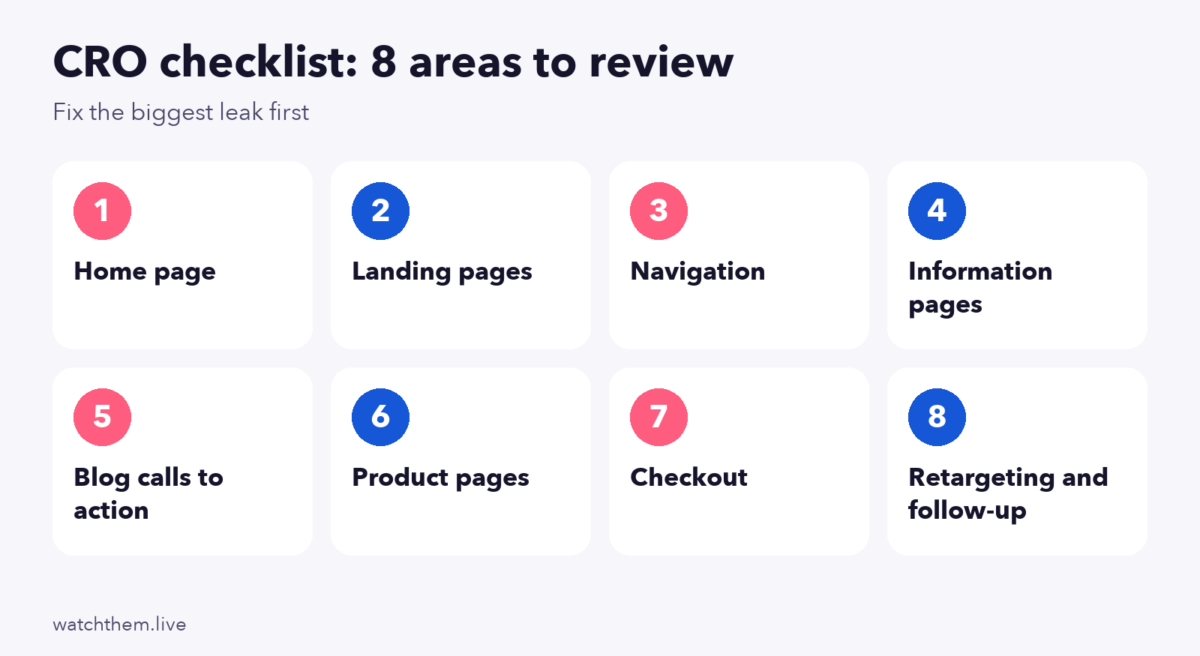
This checklist covers eight areas: the home page, landing pages, navigation, information pages, blog calls to action, product pages, checkout and follow-up. It starts with a short framework for understanding your visitors, and it ends with how to use the results. Where figures come from secondary sources and vary, we say so. For a single-page deep dive, see our landing page checklist, and for a full review process, our CRO audit guide.
Before Stepping Into CRO: Drivers, Barriers and Hooks
Before you change anything, understand why visitors act or do not act. A simple model uses three ideas:
1. Drivers
Drivers are the reasons that bring people to your site and make them want to act: a problem to solve, a price advantage, a recommendation. Find them with search terms, ad messages, surveys and sales conversations. Your headlines should speak to these reasons.
2. Barriers
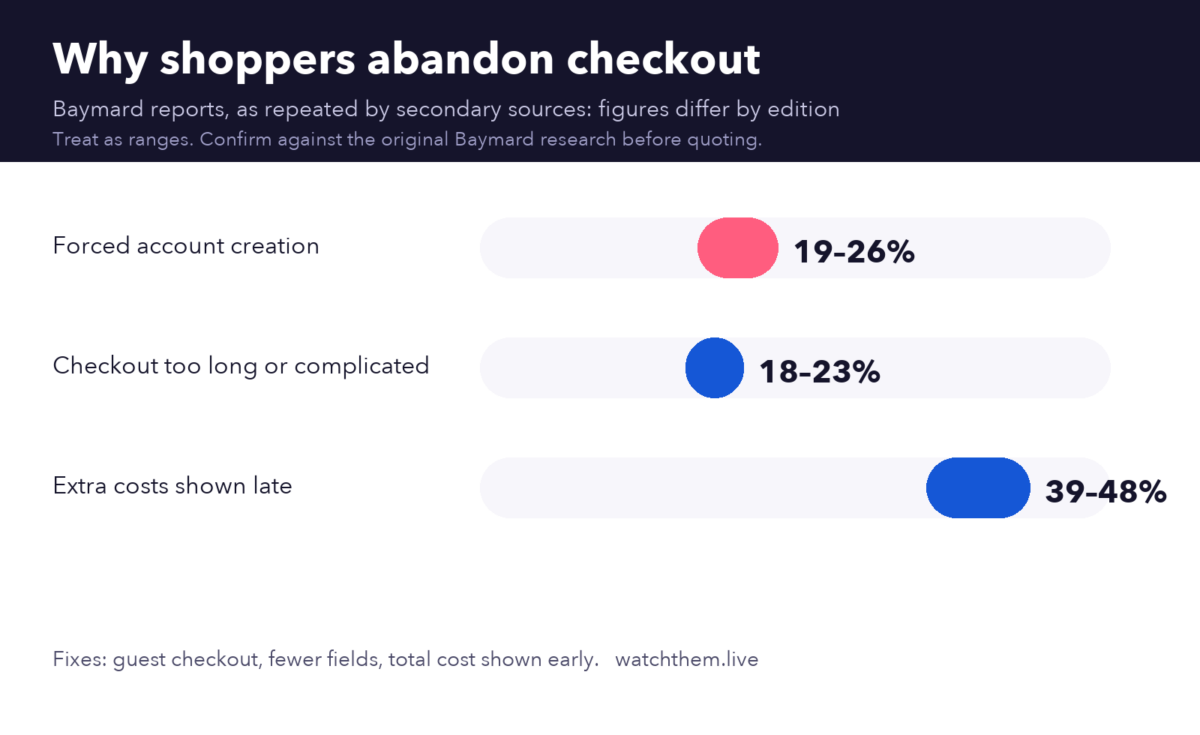
Barriers are what stop them: unclear offers, slow pages, surprise costs, confusing forms, lack of trust. Recordings, heatmaps and feedback show barriers well. Roundups that cite Baymard Institute research list forced account creation (about 19% in Baymard’s own article and higher in later secondary reports), checkout that is too long or complicated (roughly 18% to 23%) and unexpected extra costs (roughly 39% to 48%) among the leading reasons for abandoned carts, and put average cart abandonment near 70%. Exact figures differ by edition and source, so treat them as ranges.
3. Hooks
Hooks are the elements that pull a visitor forward at the right moment: a clear benefit, a guarantee, a review, a free trial or a timely reminder. Place hooks near the barriers they remove.
Conversion Rate Optimization Checklist
Use the sections below in order. Tools to support the checklist include session recordings, heatmaps and website analytics.
1. Home Page Optimization
- Clear message. Visitors should understand what you do, who it is for and why it is better within a few seconds. Use a short headline, a supporting line and one main call to action.
- Appealing, consistent design. Use a clear visual hierarchy, consistent buttons and fonts, and strong contrast. WCAG asks for at least 4.5:1 contrast for normal text. See CRAP design principles.
- White space. Space makes content easier to scan and helps the main message stand out.
- Above the fold. Show your value, a key visual and a call to action on the first screen. NN/g eyetracking in 2018 found about 57% of viewing time was above the fold, but valuable content below it still gets read. See above the fold and below the fold design.
- Testimonials and proof. Place real reviews, logos and results near the top. A Spiegel Research Center study found that products with five reviews were about 270% more likely to be purchased than products with none.
- Paths for each audience. Give new visitors, returning customers and buyers an easy next step.
2. Landing Page Optimization
- Design and focus. One goal, one offer, minimal navigation and a headline that matches the ad. Check each element with the landing page checklist.
- CTA button. Use specific text, strong contrast, enough size to tap (WCAG 2.2 sets a 24 by 24 CSS pixel minimum) and repeat it after key sections.
- Short forms. Ask only for what you need. HubSpot’s analysis of more than 40,000 landing pages found that multiple text areas and drop-downs lowered conversions most.
- Speed. Google’s Core Web Vitals target a Largest Contentful Paint of 2.5 seconds or less, an Interaction to Next Paint of 200 milliseconds or less and a Cumulative Layout Shift of 0.1 or less.
- Testing. Plan A/B tests with a hypothesis and enough traffic. See landing page testing and common testing mistakes.
3. Navigation Optimization
- Navigation flow. Keep the main menu short, use clear labels and make the most important pages easy to reach. Add search on larger sites.
- Responsive navigation. Check menus on phones: large tap targets, a visible way to open and close the menu and no overlap with content. Mobile is roughly 60% to 63% of global web traffic according to Statcounter data for 2025. See mobile CRO.
- Breadcrumbs and internal links help visitors and search engines understand where they are.
- Consistency. Use the same layout across pages. See website layout.
4. Information Page Optimization
- About us. Explain who you are, why you exist and who is behind the company. Real names, photos and history build trust.
- Contact us. Make it easy to reach you with a simple form, an email address and, where relevant, a phone number or chat. Tell visitors when to expect a reply.
- FAQ page. Answer questions about price, delivery, returns, setup and security. Link to it from product and checkout pages, and update it from real customer questions.
- Policies. Write shipping, return and privacy policies in plain language.
5. Blog Calls to Action Optimization
- Match the offer to the article. A guide about checkout should link to a related checklist or tool, not a generic page.
- Place calls to action in context, such as after a relevant section and at the end, plus a related-articles block.
- Use content upgrades, such as a template or checklist, to capture emails from readers who are not ready to buy.
- Track results. Measure clicks, sign-ups and the pages that lead to conversions.
6. Product Page (E-commerce) Optimization
- Product details. Clear titles, benefits, specifications, sizes and availability.
- Product price. Show the price, discounts and any extra costs clearly. Unexpected costs are the top reason for cart abandonment in most roundups.
- Product images. Use sharp images from several angles, zoom and, where possible, video. Compress them and set dimensions to avoid layout shifts.
- Shipping details. Show delivery times, costs and return terms on the product page, not only at checkout.
- Product reviews. Show ratings and written reviews near the buy button. Purchase likelihood tends to peak at average ratings of about 4.0 to 4.7 stars, because perfect scores can look less believable.
- Add to cart button. Make it obvious, with strong contrast. See the add to cart button guide.
7. Checkout Page (E-commerce) Optimization
- Guest checkout. Do not force account creation before purchase. Offer account creation afterward.
- Fewer fields. Baymard’s 2024 benchmark reported about 11.3 form fields in an average checkout and about 5.1 steps, and argues that fields matter more than steps. Remove what you do not need, and use autofill and address lookup.
- Show total costs early, including shipping and taxes.
- Offer several payment options, including wallets, and show trust signals such as secure-payment badges.
- Make errors easy to fix, with clear messages next to each field.
- Allow editing the cart without losing progress.
See checkout page design and shopping cart design for examples.
8. Visitor Retargeting and Follow-Up
- Retarget with relevance. Show reminders to people who viewed a product or started a form, and exclude people who already bought. Evidence on retargeting lift is mixed: one industry-wide field experiment across more than 2,000 advertisers estimated that retargeting lifts baseline conversions by about 4.6%, while a 2020 study of 11 brands saw lift fall from about 27% to 14% when heavy promotions began. Test it on your own audience and keep frequency reasonable.
- Abandoned cart and form emails. Send timely reminders with a clear offer and an easy return path.
- Follow up fast on leads. The Lead Response Management study found that contacting a web lead within five minutes made it about 21 times more likely to be qualified than waiting 30 minutes. See lead conversion.
- Respect privacy. Use consent properly, and explain how you use data.


Tracking and Testing Checklist
- Goals and key events are set up in GA4 (the new name for conversions) and tested.
- Micro conversions such as add-to-cart clicks and form starts are tracked. See micro conversions.
- Funnels are mapped, with step conversion rates. See funnel analysis.
- A test log records every hypothesis, result and lesson. See CRO testing.
- Key numbers are reviewed weekly. See website metrics.
How to Use This Checklist
- Score each item as done, partly done or missing.
- Add evidence. For each gap, note what the data shows.
- Prioritize. Rank by expected impact and effort, and start with the page closest to revenue.
- Turn gaps into hypotheses and tests. See how to build a CRO program.
- Repeat quarterly, because sites and audiences change.
Frequently Asked Questions About the CRO Checklist
What should a CRO checklist include?
A clear home page, focused landing pages, simple navigation, trust-building information pages, relevant blog calls to action, strong product pages, a smooth checkout and follow-up for visitors who leave.
Where should I start with CRO?
Start with the page or step closest to revenue that has the biggest drop-off, such as checkout or your main landing page, and use recordings and heatmaps to find the cause.
How often should I review my CRO checklist?
Review key pages quarterly and after any major change to your site, pricing or campaigns, and check key numbers weekly.
What is the difference between a CRO checklist and a CRO audit?
A checklist lists what should be in place. An audit goes deeper by combining the checklist with data, recordings, heatmaps and testing to explain what is actually happening.
Do I need special tools?
You can start with analytics, recordings and heatmaps. Add testing tools when you have enough traffic to run reliable tests.
Conclusion
A CRO checklist keeps your work organized: understand drivers, barriers and hooks, review the home page, landing pages, navigation, information pages, blog calls to action, product pages, checkout and follow-up, then turn the gaps into prioritized tests. Use data to decide what to fix first, record your results and repeat the review regularly. Small, steady improvements across these areas add up to more conversions from the traffic you already have.
