
Page Contents
Last updated: October 2026
A landing page has one job: to turn a visitor from an ad, email or search result into a lead or customer. You cannot know how well it does that job until you test it. Landing page testing means running controlled experiments on versions of a page so that decisions come from data instead of opinions. Even a small change, such as a clearer headline or a shorter form, can move results noticeably, and the gains repeat on every visitor you send to the page.
This guide covers what landing page testing is, which methods to use, what to test first, a step-by-step process, the tools available in 2026 and the mistakes that ruin results. It also updates a fact that older articles get wrong: Google Optimize no longer exists.
What Is Landing Page Testing?
Landing page testing is the practice of comparing two or more versions of a page to see which one produces more conversions, such as form submissions, sign-ups or purchases. Traffic is split randomly between the versions, and the results are measured against a goal. The version that wins on your main metric, without hurting secondary metrics such as bounce rate, becomes the new default.
Testing is a core part of conversion rate optimization. It works best alongside research: analytics tells you where visitors leave, and recordings and heatmaps show why, so your tests are based on real problems.
Why Is Landing Page Testing Important?
Landing pages sit at the point where your marketing spend turns into results. If the page underperforms, every ad click costs more than it should. Testing matters because:
- Visitors behave differently than you expect. Designers and marketers are poor predictors of what will convert.
- Gains compound. A 10% lift on a page that receives thousands of visits a month adds up quickly.
- It lowers cost per lead. A higher conversion rate means you get more leads from the same ad budget.
- It reduces risk. You can try a bold idea on part of your traffic before committing to it.
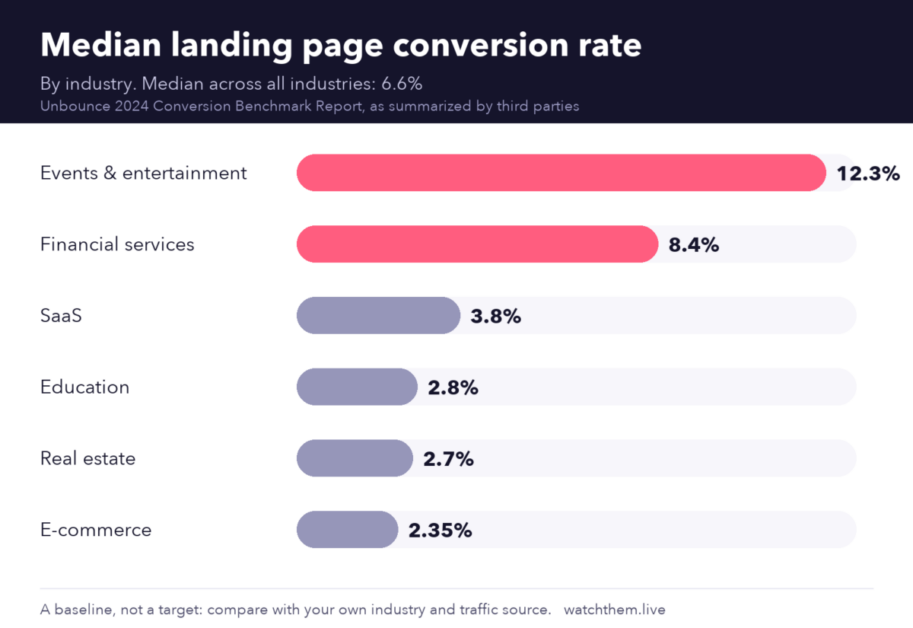
It also helps to know where you stand. Unbounce’s 2024 Conversion Benchmark Report, based on over 41,000 landing pages and tens of millions of conversions, reported a median landing page conversion rate of about 6.6% across industries. Industry medians vary widely, from roughly 2–3% for e-commerce and real estate to above 12% for events and entertainment, according to summaries of that report. These figures are a baseline, not a target.
Landing Page Testing Methods
A/B Testing
In an A/B test you compare your current page (A) with a single variation (B), changing one element at a time. It is the simplest and most common method and works well when you have a clear hypothesis, for example “a shorter headline will increase sign-ups.”
Split URL Testing
Split URL testing sends visitors to two completely different page addresses. Use it for major redesigns or when the pages are built on different templates. The principle is the same as an A/B test, but the changes are bigger.
Multivariate Testing
Multivariate testing changes several elements at once, such as the headline, image and button, and measures which combination works best. It needs much more traffic than A/B testing because every combination must get enough visitors. Read more in our guide to multivariate testing.
Personalization and Segment Tests
Different audiences respond to different messages. You can test versions for specific segments, such as visitors from a certain ad campaign, new versus returning users or mobile versus desktop. See our article on website personalization for ideas.
Qualitative Testing
Not every site has enough traffic for statistical tests. In that case, use qualitative methods to find issues and fix them directly:
- Session recordings to watch how real visitors read, scroll and hesitate.
- Heatmaps to see which elements attract clicks and where people stop scrolling.
- On-page surveys and short user tests to hear the reasons in visitors’ own words.


What Should You Test on a Landing Page?
Start with elements that have the biggest influence on the decision to act:
- Headline and subheadline. Test benefit-led versus feature-led wording, and short versus long.
- Call to action (CTA). Test the button text, color contrast, size and position. Specific text such as “Get my free quote” often beats “Submit.”
- Form length. Remove fields you do not need and test multi-step forms against single-step ones.
- Hero image or video. Test product-in-use photos against illustrations, or a video against a static image.
- Social proof. Test where you place testimonials, ratings and client logos.
- Page length and layout. Some offers convert better with a short page, others with more detail.
- Copy reading level. Unbounce’s report found that pages written at a fifth to seventh grade level converted at about 11.1%, against about 7.1% for pages written at an eighth or ninth grade level. Plain language tends to win.
- Offer and pricing presentation. Test discounts, guarantees and how you display costs.
Use our landing page checklist to review the basics before you start testing.
How to Test a Landing Page: Step by Step
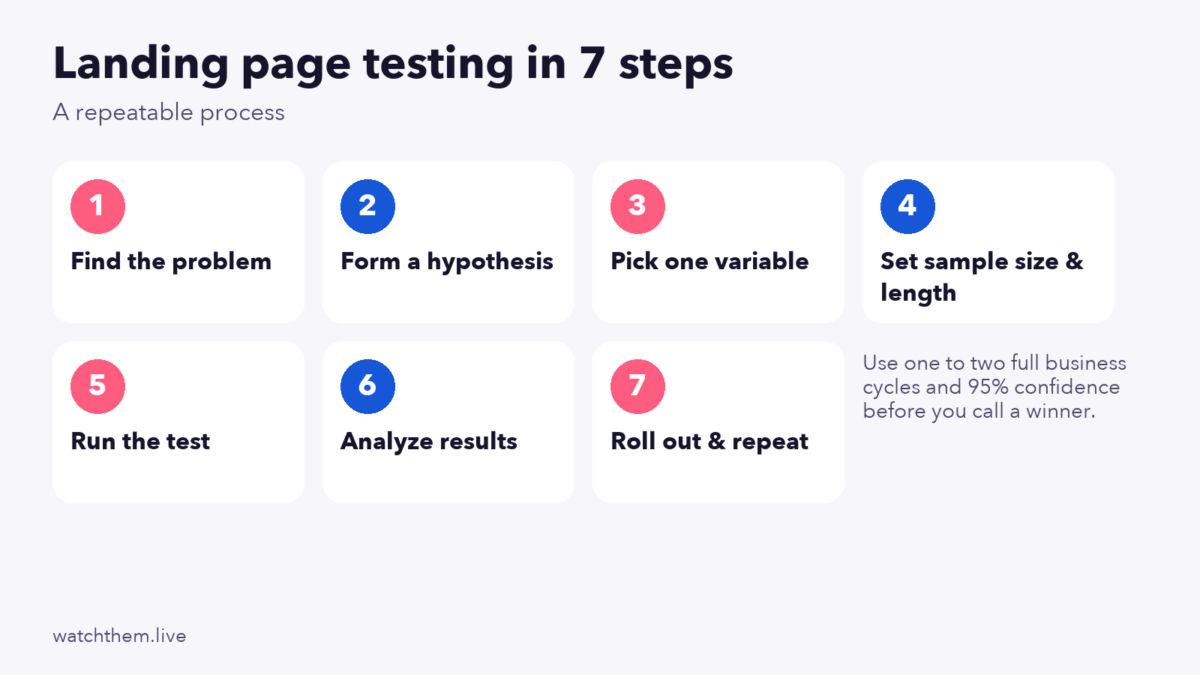
- Find the problem. Review analytics, recordings and heatmaps to see where visitors drop off or ignore key elements.
- Form a hypothesis. Write it as “If we change X, then Y will happen, because Z.” The “because” forces you to base the idea on evidence.
- Pick one variable. Change one meaningful element per test so you know what caused the result.
- Choose your main metric. Define the primary conversion, such as lead form submissions, and secondary metrics, such as bounce rate. You can also watch micro conversions like button clicks and video plays.
- Calculate sample size and duration. Estimate how many visitors each version needs, based on your current conversion rate and the smallest lift you care about. Then divide by your daily traffic. Most sources recommend running for at least one to two full business cycles, often two weeks, so weekday and weekend behavior are both covered.
- Run the test without peeking. Stopping the moment the results look good is the most common mistake in online experiments, because early results swing widely.
- Analyze and record. Use a 95% confidence level as a common standard. Check results by device and traffic source, and document what you learned, including the losing tests.
Landing Page Testing Tips
- Test for different audiences. Mobile visitors, returning customers and visitors from different ads may need different pages. Segment your results.
- Prioritize with a simple score. Rank ideas by expected impact, confidence and effort, and start with the high-impact, low-effort ones.
- Keep it simple. One page, one goal, one main call to action. Remove navigation links that lead visitors away.
- Test on mobile first. Many visits come from phones, so check tap targets, loading speed and form usability. See mobile CRO.
- Speed matters. A slow variant will lose no matter how good the design is, so keep both versions equally fast.
- Retest over time. Audiences and markets change. A winner from last year may not win today.
- Share what you learn. Apply winning ideas to other pages and your conversion rate optimization strategies.
Landing Page Testing Tools in 2026
Google Optimize is gone. Many older guides still recommend it, but Google retired Optimize, including Optimize 360, on September 30, 2023. Google Analytics 4 has no built-in A/B testing, so you need a third-party tool. Google named Optimizely, AB Tasty and VWO as its initial integration partners for GA4. Many other platforms also exist, and features and prices change, so compare current options before you buy. Our list of CRO tools is a good starting point.
Choose a tool based on:
- Your traffic volume and budget
- Whether you need visual editing or code-level control
- Integration with your analytics, email and landing page builder
- Statistical methods and reporting quality
- Impact on page speed
Whatever you use for experiments, add behavior analytics to understand the results. WatchThemLive gives you session recordings, heatmaps, goal and event tracking and website analytics with filters by device, country and traffic source. If a variant wins or loses, the recordings and heatmaps help you see why. Teams without time for in-house testing can also look at CRO agencies.
Common Landing Page Testing Mistakes
- Testing without a hypothesis. Random changes teach you little, even when they win.
- Changing too many things at once. You will not know which change mattered, unless you run a proper multivariate test with enough traffic.
- Stopping early. Wait for the planned sample size and duration, even if one version looks like a clear winner.
- Ignoring seasonality and campaigns. A sale, holiday or new ad can distort results. Avoid starting tests right before major events.
- Looking only at the top metric. A version that raises sign-ups but brings low-quality leads is not a real win. Check lead quality and downstream sales.
- Testing with too little traffic. If you cannot reach a reliable sample in a reasonable time, use qualitative research and bigger changes instead.
- Not documenting results. Without a log of past tests, teams repeat the same experiments.
Frequently Asked Questions About Landing Page Testing
What is landing page testing?
Landing page testing is the process of comparing versions of a page, usually with an A/B test, to find out which one gets more conversions, so that you can base design and copy decisions on data.
How long should you run a landing page test?
Calculate the required sample size first, then run the test for at least one to two full business cycles. For many sites that means two weeks or more. Low-traffic sites often need four to eight weeks.
How much traffic do you need for A/B testing?
It depends on your baseline conversion rate and the lift you want to detect. As a rough rule, aim for at least a few hundred conversions per variation. Use a sample size calculator for a better estimate.
What should I test first on a landing page?
Start with the headline, the main call to action and the form, because they have the most influence on whether visitors act.
What replaced Google Optimize?
Nothing from Google replaced it. Google Optimize was shut down on September 30, 2023, and GA4 works with third-party testing tools such as Optimizely, AB Tasty and VWO.
Conclusion
Good landing page testing is a habit, not a one-off project. Find real problems with analytics, recordings and heatmaps, write a clear hypothesis, test one change at a time, give each test enough traffic and time, and document every result. Over a few months, steady improvements to headlines, forms and calls to action can deliver a much higher return from the same traffic.
