

Page Contents
Last updated: October 2026
The name sounds like a joke, but CRAP design principles are one of the most practical tools in visual design. CRAP stands for Contrast, Repetition, Alignment and Proximity, four simple principles that make pages look organized, professional and easy to use. They come from The Non-Designer’s Design Book by Robin Williams, which teaches beginners to see and fix design problems without needing years of training.
Good visual design matters for conversions as well as looks. Research by Carleton University, published in 2006, found that people form a judgment about a web page’s visual appeal extremely quickly: ratings given after just 50 milliseconds matched those given after longer viewing, according to coverage of the study. In other words, your layout makes a first impression before anyone reads a word. This guide explains each principle, how to apply it to websites and apps, and how to check that your design really works.
What Are the Four CRAP Design Principles?
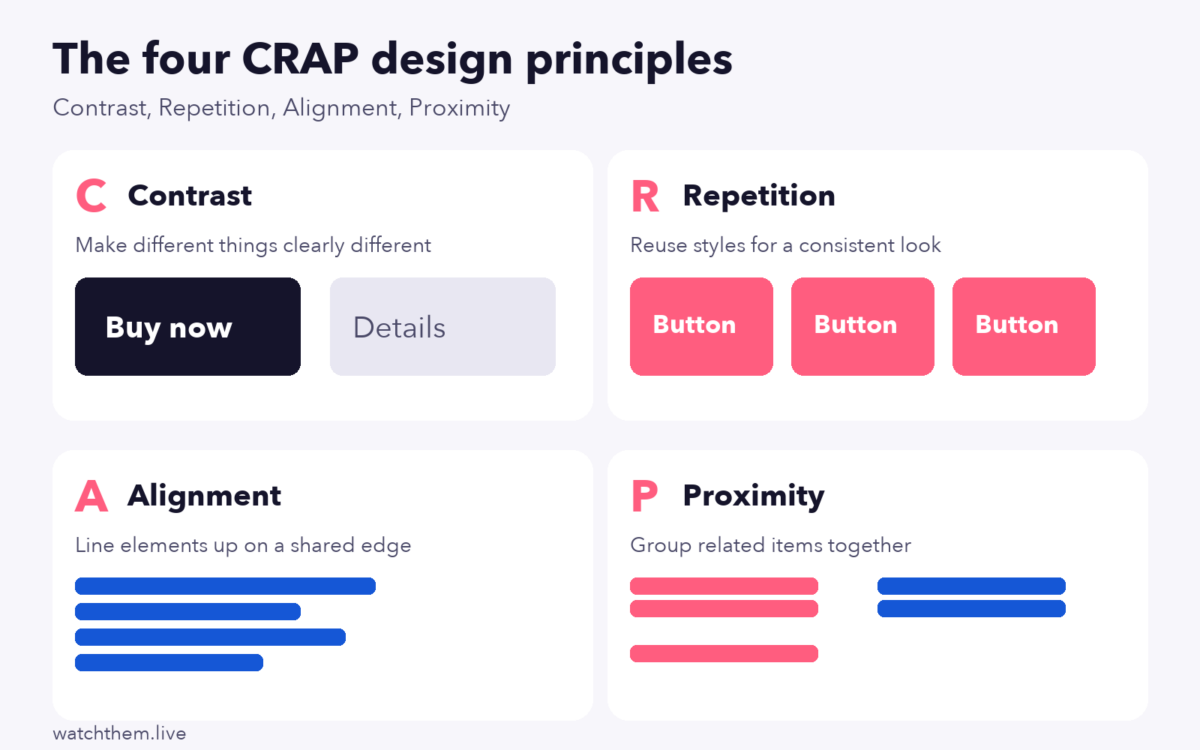
Robin Williams’s book organizes good design around four principles. In the fourth edition, each one gets its own chapter, with proximity, alignment, repetition and contrast covered one after another. Here is a quick summary:
- Contrast: if two items are not exactly the same, make them very different. Contrast creates emphasis and guides the eye.
- Repetition: repeat visual elements, such as colors, fonts and spacing, to create unity and consistency.
- Alignment: every element should have a visual connection to something else on the page, usually through a shared edge or grid.
- Proximity: place related items close together and unrelated items apart, so the structure is clear at a glance.
Why Do CRAP Design Principles Matter for Conversions?
Design is not decoration. Every choice either helps a visitor understand your offer or adds friction. When contrast shows the next step, repetition builds familiarity, alignment makes pages easy to scan and proximity groups related information, visitors spend less effort and make decisions faster. That is why the principles fit naturally into conversion rate optimization: clearer pages tend to produce more completed forms, sign-ups and purchases.
They are also cheap to apply. You do not need new tools or a redesign, only a careful review of spacing, color, type and layout on the pages that matter most, such as your home page, pricing page and checkout.
How to Use CRAP Design Principles to Create a Better User Experience
1. Use Contrast
Contrast tells visitors what matters most. Without it, every element competes for attention, and nothing stands out. You can create contrast with color, size, weight, shape and white space.
- Make your main call to action unmistakable. A dark button on a light background, or the reverse, draws the eye far faster than a button that blends in. Keep secondary actions quieter, as in the example above, so there is only one clear next step. See our guide to the add to cart button for examples.
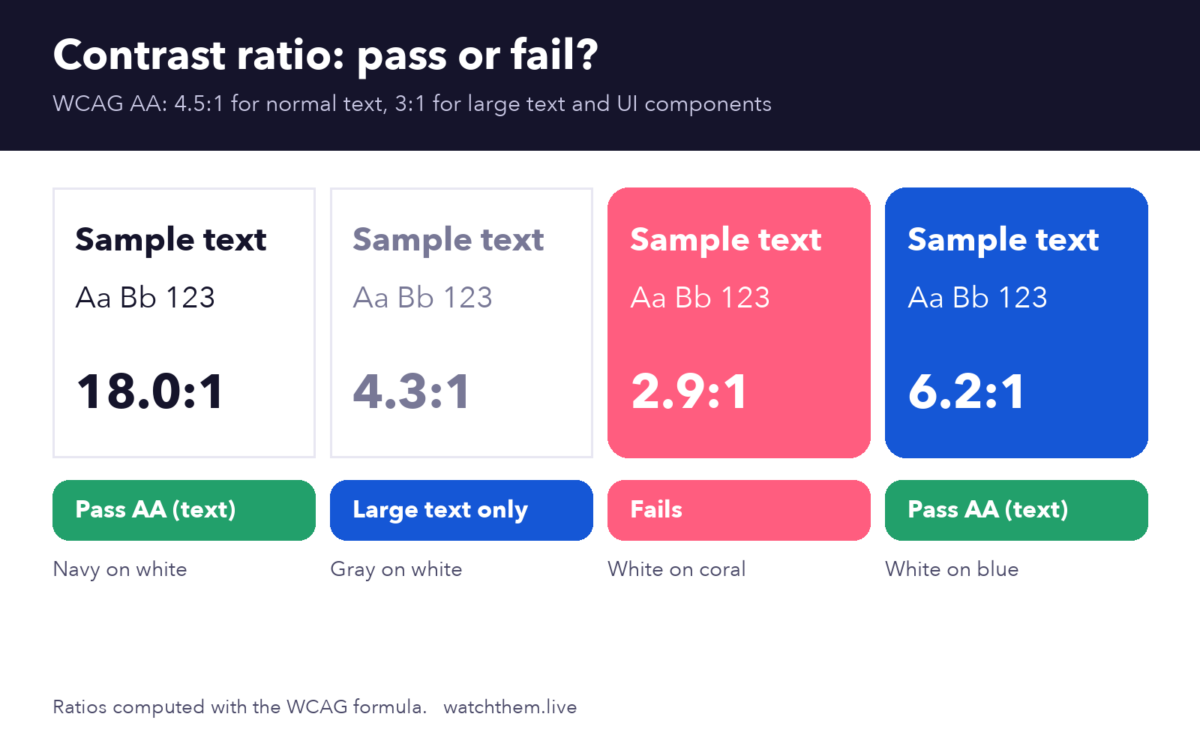
- Check text contrast. The Web Content Accessibility Guidelines (WCAG) require a contrast ratio of at least 4.5:1 for normal text and 3:1 for large text and interactive components. Many beautiful designs fail this test, especially light gray text and white text on bright or pastel buttons. In our example below, a bright pink with white text scores only about 2.9:1 and fails, while white on a deeper blue scores about 6.2:1 and passes.
- Use size and weight to build hierarchy. A large, bold headline, a medium subheading and regular body text help visitors scan.
- Pair fonts carefully. Combine two clearly different fonts, such as a bold sans-serif heading and a simple body font, instead of two similar ones.
2. Use Repetition
Repetition makes a site feel like one product instead of a collection of pages. When buttons, headings, icons and spacing follow the same rules everywhere, visitors learn the interface quickly and trust it more.
- Create a small design system: a color palette, two fonts, a set of button styles and a spacing scale.
- Reuse the same layout for similar pages, such as product pages or blog posts.
- Keep icons in one style, and keep the meaning of colors consistent, for example one color for primary actions and another for warnings.
- Repeat key elements such as your call to action at logical points, so it is always within reach.
Too much repetition can become dull, so combine it with contrast to keep pages lively.
3. Use Alignment
Alignment is what makes a layout look deliberate. Elements that line up on a shared edge create clear paths for the eye, while stray, almost-aligned elements make a page look messy.
- Use a grid, such as 12 columns on desktop, and place elements on it.
- Left-align body text for easy reading, and avoid centering long paragraphs.
- Align form labels and fields consistently, so people can move down the page without effort.
- Align images, buttons and text blocks with common edges instead of placing them by eye.
For layout ideas, read our article on website layouts that are UX friendly.
4. Use Proximity
Proximity is about grouping. Items that are close together look related, and items that are far apart look separate. This simple idea cuts confusion in menus, forms, product cards and checkout pages.
- Put a label next to its field, not closer to the field above.
- Group product name, price and rating, and leave more space before the next product.
- Keep a call to action near the benefit or offer it relates to.
- Use white space, not only lines and boxes, to separate sections.
Proximity matters most in complex flows such as checkout. See our guide to shopping cart design for practical examples.
Putting CRAP Design Principles Into a Landing Page
Here is how the four principles work together on a typical landing page:
- Proximity: group the headline, subheading and button together in the hero section.
- Contrast: make the headline the largest text and the button the most colorful element.
- Alignment: line up the headline, text and form on one left edge or in clear columns.
- Repetition: use the same button style, icon style and card layout in every section.
Combine this with our landing page checklist to review content, speed and trust as well.
Applying the Principles on Mobile
Small screens make weak design obvious, so the principles matter even more on mobile:
- Contrast: keep the main button large, with generous space around it, so it is easy to tap. WCAG 2.2 sets a minimum target size of 24 by 24 CSS pixels, and bigger is better for thumbs.
- Repetition: keep navigation, icons and button styles identical to the desktop version so returning visitors feel at home.
- Alignment: use a single column with a consistent left edge, and avoid placing elements side by side when they become cramped.
- Proximity: leave clear space between tappable items to prevent accidental taps, and keep each label close to its field.
Test your pages on real phones, and use recordings to see where visitors struggle. Our guide to mobile CRO covers more tips.
Accessibility Goes Beyond Contrast
Good design should work for everyone. Alongside contrast ratios, make sure that:
- Color is never the only way to show meaning, for example an error should include text or an icon as well as red.
- Text can be enlarged without breaking the layout.
- Every interactive element can be reached and used with a keyboard, with a visible focus outline.
- Images have descriptive alt text, and forms have clear labels.
These steps reinforce the CRAP principles, because a design that is consistent, aligned, grouped and high in contrast is usually easier to use for everyone.
How to Know If Your Design Is Working
The principles tell you how to design. Data tells you whether it works for your visitors. Use these methods:
- Watch real sessions. Session recordings show whether visitors find the main button, hesitate at a form or miss important information.
- Check heatmaps. Heatmaps reveal whether clicks go to the right elements, and where attention stops.
- Track UX metrics. Watch bounce rate, time on page, click-through rate on key buttons and task completion. Our article on key website UX metrics explains what to measure.
- Test accessibility. Run a contrast checker and try navigating with a keyboard.
- A/B test changes. Compare two versions of a layout and keep the one that converts better. See landing page testing.


For the link between design and results, read about CRO and UX.
Common Design Mistakes the CRAP Principles Prevent
- Everything looks equally important, because there is no contrast.
- Inconsistent buttons and fonts, because nothing is repeated.
- A messy look, because elements are almost, but not quite, aligned.
- Confusing forms and menus, because related items are far apart and unrelated ones are close.
- Low-contrast text, which hurts readability and accessibility.
- Decorating without purpose. Every visual choice should help visitors understand or act.
Frequently Asked Questions About CRAP Design Principles
What does CRAP stand for in design?
CRAP stands for Contrast, Repetition, Alignment and Proximity, four basic principles of visual design.
Who created the CRAP design principles?
They were popularized by Robin Williams in The Non-Designer’s Design Book, a guide for people without formal design training.
Can I use CRAP principles for websites and apps?
Yes. They apply to any visual layout, including websites, mobile apps, emails, presentations and print materials.
What is a good contrast ratio for text?
WCAG level AA asks for at least 4.5:1 for normal text and 3:1 for large text. Use a contrast checker to test your color choices.
Which principle matters most?
They work together. If you can only fix one thing first, start with proximity and alignment to make the structure clear, then add contrast to guide attention.
Conclusion
The CRAP design principles give you a simple checklist for better layouts: make important things stand out, repeat styles for consistency, align elements on a shared edge and group related items. Apply them to your key pages, check the result with recordings, heatmaps and contrast tests, and refine over time. Clear, consistent design helps visitors understand your page faster, which is the first step toward getting them to act.
