
Page Contents
Last updated: October 2026
Browsers can now run rich, app-like experiences, from online stores and dashboards to booking tools and editors. These website applications deliver a lot of value, but they also depend on large amounts of code, and heavy code means slow pages. Because speed affects conversions, search visibility and user satisfaction, website application optimization is as important as the design itself.
This guide explains what a website application is, its benefits, how to measure performance and eight practical tips to make yours faster in 2026. Where figures come from secondary summaries, we say so.
What Is a Website Application?
A website application, or web app, is an interactive program that runs in the browser and responds to user actions, instead of simply displaying static pages. Common types include:
- Single page applications (SPAs), which load one page and update content with JavaScript without full reloads. They feel fast after the first load but can be heavy at the start.
- Multi-page, server-rendered applications, where the server builds each page and sends finished HTML, which is often faster to show but may reload more often.
- Hybrid approaches, such as server-side rendering or static generation combined with client-side interactivity, which try to give both a fast first view and rich behavior.
Which one is right depends on your product. The important point is that all of them benefit from careful performance work.
Benefits of a Website Application
- Richer experience. Real-time updates, drag and drop, filters and dashboards feel closer to a native app.
- No installation. Users open a link in any modern browser on any device.
- Easy updates. You deploy once, and everyone gets the new version.
- One codebase for many devices, which lowers development cost.
- Better measurement. You can track every interaction, which supports UX metrics and improvement.
Why Does Website Application Performance Matter?
Speed is part of the user experience. Google’s Core Web Vitals set targets, measured at the 75th percentile of page loads: Largest Contentful Paint (LCP) of 2.5 seconds or less, Interaction to Next Paint (INP) of 200 milliseconds or less and Cumulative Layout Shift (CLS) of 0.1 or less. INP replaced First Input Delay as the responsiveness metric in March 2024, which matters for web apps because they are full of interactions. A Deloitte study for Google found that making mobile sites 0.1 seconds faster raised retail conversion by about 8.4%, so even small gains can pay off.
Measure First, Then Optimize
Do not guess where the slowness is. Use measurement to find the biggest bottleneck:
- Lighthouse is built into Chrome DevTools and audits performance, accessibility, best practices and SEO in a lab setting.
- PageSpeed Insights combines a lab test with real-world field data when it is available.
- Google Search Console reports Core Web Vitals for groups of pages, based on real users.
- Real user monitoring and analytics show how actual visitors experience speed on different devices and networks.
Lab tests are good for finding and fixing issues. Field data shows whether real users feel the difference. For a wider view of metrics, read our guides to website performance metrics and website metrics.
Top 8 Tips for Optimizing a Website Application
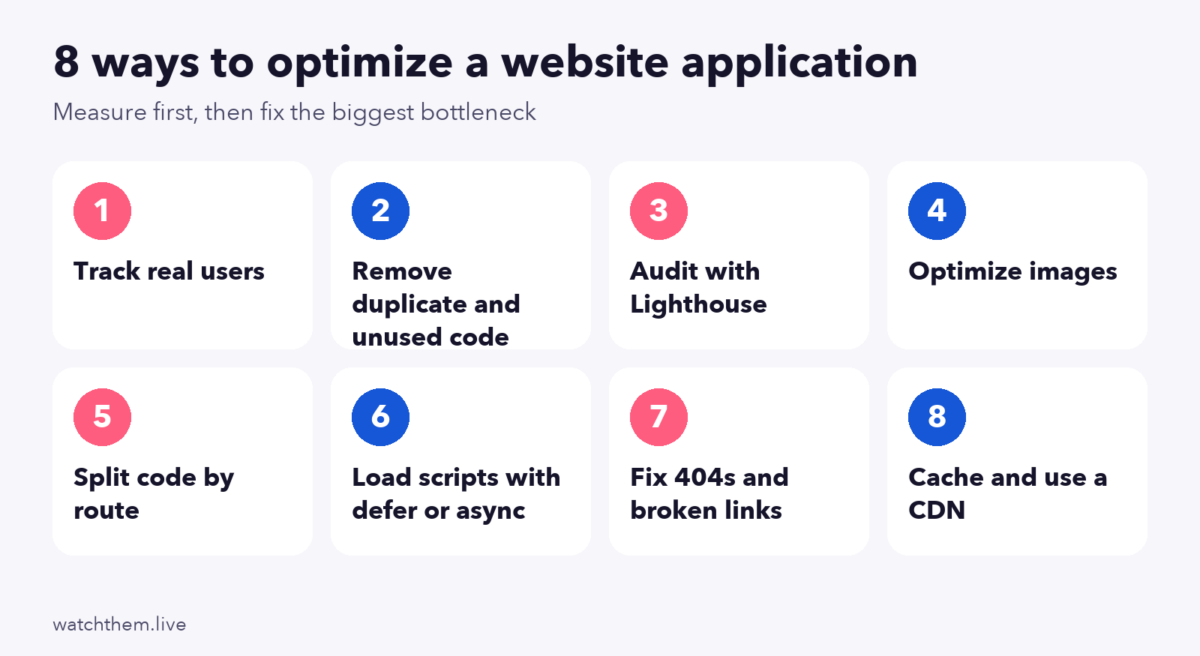
1. Track Your Real Audience
Performance depends on who your users are. Check which devices, browsers and connection speeds they use, and test on mid-range phones, not just a fast developer laptop. Segment results by device and country, then focus on the groups that matter most for your business. Behavior tools can show where real visitors struggle. For example, session recordings reveal frozen buttons, slow screens and rage clicks, and heatmaps show whether people notice what you built.
2. Remove Duplicate and Unused JavaScript and CSS
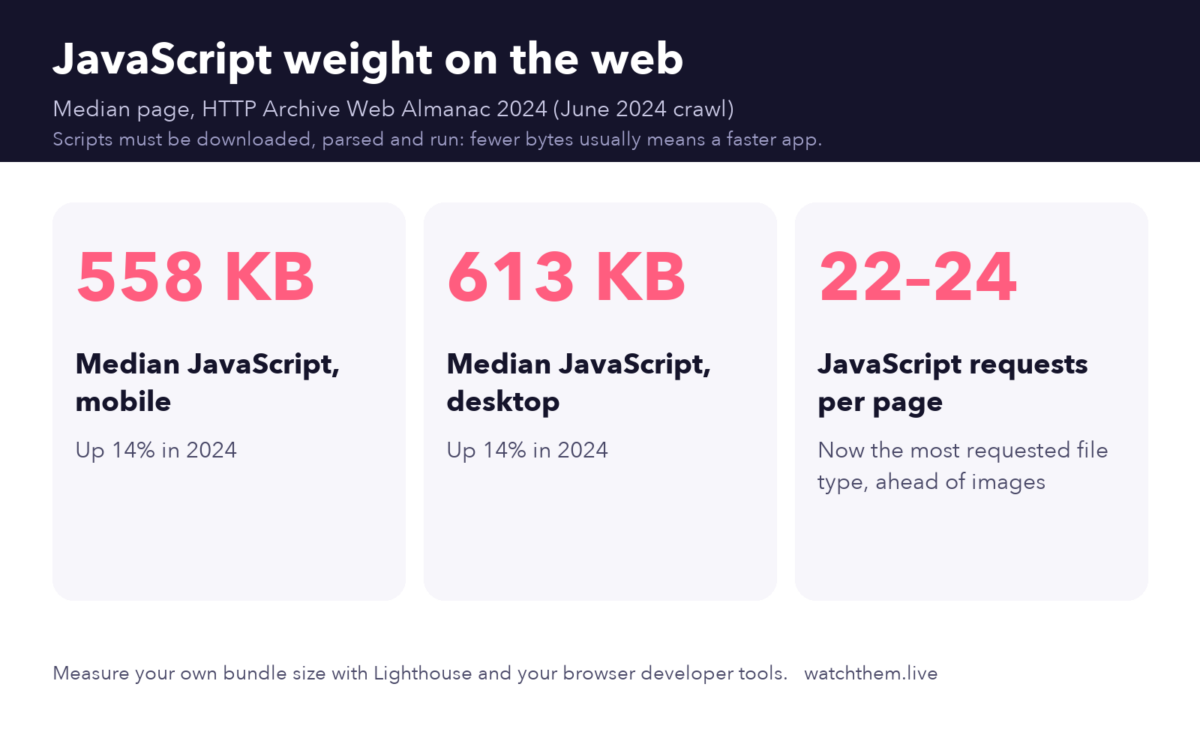
Code you do not need still has to be downloaded, parsed and run. The HTTP Archive’s 2024 Web Almanac found that the median JavaScript payload on mobile pages reached about 558 kilobytes, up 14% in a year, and that JavaScript overtook images as the most requested file type. Trim your share:
- Remove duplicate libraries and old polyfills.
- Use tree shaking so that unused exports are left out of the bundle.
- Audit third-party scripts such as tags, widgets and chat tools, and remove those that do not earn their cost.
- Minify and compress files, and use modern compression such as Brotli where your server supports it.
- Remove unused CSS or load it only where it is needed.
3. Audit With Lighthouse Regularly
Run Lighthouse on your most important pages and flows, such as the home page, product pages and checkout. Check the performance score, but pay more attention to the specific opportunities and diagnostics, such as render-blocking resources, large network payloads and long tasks. Add automated checks to your build process so a regression is caught before it reaches users.
4. Optimize Your Images
Images are a large part of most pages, so small savings add up. Use these steps:
- Choose modern formats. WebP and AVIF usually give smaller files than JPEG at similar quality. One secondary guide estimates that AVIF can save around 50% against JPEG, but results vary by image, so test your own.
- Serve the right size. Use responsive images (the
srcsetattribute) so phones do not download desktop-sized files. - Set width and height so that the browser reserves space and the layout does not shift.
- Lazy-load images below the fold with
loading="lazy", which is supported in all major browsers. - Do not lazy-load the main image at the top, which is often the LCP element. Load it early, and consider
fetchpriority="high".
5. Use Code Splitting
Instead of sending your whole app in one large bundle, split it into smaller pieces and load each one only when it is needed. A common approach is route-based splitting, where each page or section has its own chunk, plus dynamic imports for heavy features such as charts, editors or maps that users may never open. This reduces the code needed for the first view, which helps LCP and INP.
6. Load Scripts the Right Way
Older advice suggested putting scripts at the bottom of the page. Today there are better tools. A regular script in the head blocks the browser from building the page while it downloads and runs. Use the defer attribute for scripts that need the page structure, since it downloads in parallel and runs after parsing, in order. Use async for independent scripts such as analytics, which run as soon as they are ready, in no guaranteed order. Also consider server-side rendering or static generation for pages where content should appear quickly and be easy for search engines to read.
7. Fix 404 Errors and Broken Links
Broken links frustrate users and waste crawl budget. Check your site for 404 errors using Google Search Console and a crawler, update internal links, add redirects when you move pages and create a helpful 404 page that points people to useful content. In an SPA, make sure that missing routes return a proper error status to crawlers, instead of a blank page that looks like a normal page.
8. Use Caching and a Content Delivery Network
Caching stores files closer to users and avoids repeated downloads. Set long cache lifetimes for versioned static files, use a content delivery network (CDN) to serve them from nearby locations and keep API responses efficient. Together with smaller bundles, this makes repeat visits feel instant.


Performance and Conversions
Performance work pays off when you connect it to business goals. Track how speed relates to conversion rate, bounce and engagement, and use the landing page checklist to review the pages that matter. For mobile visitors, see mobile CRO. A quick CRO audit can help you decide where speed fixes will have the biggest effect, and the website optimization guide covers the wider picture.
Common Website Application Optimization Mistakes
- Optimizing without measuring, which wastes effort on small problems.
- Testing only on fast devices and networks.
- Adding third-party scripts without checking their cost.
- Lazy-loading everything, including the main image.
- Ignoring layout shift, which hurts CLS and makes pages feel unstable.
- Shipping one giant bundle because splitting seemed too complicated.
- Treating performance as a one-time project. New features add weight, so monitor it continuously.
Frequently Asked Questions About Website Application Optimization
What is a website application?
It is an interactive program that runs in a web browser, such as a dashboard, an online store or an editor, and responds to what users do.
How do I check my web app’s performance?
Use Lighthouse in Chrome DevTools, PageSpeed Insights and the Core Web Vitals report in Google Search Console, and add real user monitoring to see how visitors experience your app.
What are good Core Web Vitals scores?
Google defines good as an LCP of 2.5 seconds or less, an INP of 200 milliseconds or less and a CLS of 0.1 or less, measured at the 75th percentile of page loads.
Should I use defer or async for scripts?
Use defer for scripts that depend on the page structure or on each other, because they run in order after parsing. Use async for independent scripts, such as analytics, that can run in any order.
Does speed affect SEO and conversions?
Yes. Core Web Vitals are part of Google’s page experience signals, and faster pages tend to convert better. A Deloitte study for Google found that a 0.1-second mobile speed improvement raised retail conversion by about 8.4%.
Conclusion
Website application optimization is about sending less code, loading it smartly and checking the results with real data. Measure with Lighthouse and field data, trim JavaScript and CSS, optimize images, split code, load scripts with defer or async, fix broken links and cache aggressively. Revisit the numbers regularly, because every new feature adds weight. Faster, smoother apps keep users happy and help your conversions and search visibility.
